I built a tmux orchestration layer for Claude Code in March 2026, because subagents at the time were crippled: a hard turn budget, no hooks, no MCP, and they ate my main context window. Spawning full Claude Code sessions as tmux workers fixed all four.
Four months later, all four of those reasons are gone. Claude Code absorbed them.
This post is the honest version. What subagents now do natively, what tmux still genuinely buys you, and the send-keys plumbing - which is the part that did not age, and is still the hard bit if you build this yourself.
Subagents now get their own context window, MCP servers, hooks, a configurable turn budget, worktree isolation, and background execution. If that covers you, use them - it is less machinery. tmux orchestration is still worth it for one thing: a real attachable terminal session you can take over mid-run.
Want the foundational patterns first? The free 3-pattern guide covers memory, delegation, and knowledge graphs at concept level.
What Changed in 2026
The original argument in this post rested on four subagent limits. Here is where each one stands, checked against Anthropic's subagent docs:
- -~25 turn limit, not configurable
- -No hook events fired
- -No MCP server access
- -Shared the parent context window
- -No isolation - same working tree
- +maxTurns is a frontmatter field
- +hooks configurable per agent
- +mcpServers configurable per agent
- +Own context window per subagent
- +isolation: worktree, plus background
Subagent definitions now accept mcpServers, hooks, maxTurns, skills, memory, effort, background, and isolation directly in frontmatter. Hook events carry agent_id and agent_type, so your hook system can see and gate subagent tool calls the same way it gates your own. MCP servers reach subagents. And "each subagent runs in its own context window" is now the documented default, not a workaround.
On top of that, Claude Code shipped three things that overlap with orchestration directly:
- Agent Teams - multiple Claude Code instances as teammates, with a shared task list and messages between them. Still experimental: you have to set
CLAUDE_CODE_EXPERIMENTAL_AGENT_TEAMS=1to get it. And note what its split-pane display mode requires - tmux, or iTerm2. The pattern was not wrong. It got absorbed, and tmux is what it runs on. - Dynamic workflows - a JavaScript script that orchestrates subagents at scale, so the fan-out is deterministic instead of model-decided. The documented ceiling is 16 concurrent agents (fewer on a machine with few CPU cores) and 1,000 agents total per run.
--worktree- git worktree isolation as a flag, so parallel agents stop colliding on the same files.
So the honest recommendation in July 2026 is: try subagents first. For most parallel work they are now enough, and they are one file instead of a bash control loop. Agent Teams is the other native path, but it is behind an experimental flag - which is exactly the kind of thing that moves, so check the docs rather than this post before you build on it.
What tmux Orchestration Still Buys You
Three things survive, and only three. If none of them matter to you, stop here and use the native tools.
A session you can attach to. This is the real one. A tmux worker is a Claude Code instance in a terminal. You can tmux attach, watch it think, interrupt it, type into it, answer its question by hand, and let it continue - without killing the run or losing its context. A subagent is a black box that returns a report. When a long autonomous run goes sideways at minute 40, being able to take the wheel is worth the whole control loop.
Full session lifecycle. Workers get compaction, /clear, /resume, slash commands, and mid-run model switching via send-keys. They are complete sessions, so anything you can do in your own terminal, they can do.
Orchestration you own. The control loop is bash and JSON files on disk. You can run it on a server, across repos, over SSH, on a schedule, or wire it into anything. No dependency on a feature staying in the product.
Everything else in the original argument - context isolation, hooks, MCP, turn budget - is now table stakes on both sides.
Where This Sits in the 2026 Landscape
Search "claude code tmux orchestrator" today and you get four kinds of result, which is worth knowing before you pick one.
Anthropic's own docs. Agent Teams is the first-party answer. Experimental, but first-party. Read it before anything else on this list, including this post.
Orchestrator repos that stopped. Several rank well and are dormant. The most prominent one I found has not had a commit since July 2025 - before subagents got hooks, before MCP reached them, before isolation: worktree existed. A tmux orchestrator written against the old constraints is solving a problem Claude Code has since solved. Check the commit date before you clone anything in this category, including mine.
Buy-versus-build comparison pages. Useful for the taxonomy, and they are usually selling the "buy" side. Read the framing accordingly.
Setup guides and videos. Mostly "how to get tmux split-panes working with Agent Teams", which is a genuinely different task from building your own control loop.
This post is the fourth thing: a control loop I actually run, with the parts that broke written down. That is the whole claim. If Agent Teams covers you, use Agent Teams.
Claude Code tmux send-keys: The Foundation
If you do build it, the whole architecture depends on one thing: reliably delivering prompts to a running Claude Code session via tmux send-keys. This took more iteration than I expected, and it has not changed.
Three things matter. First, use send-keys -l (literal mode) with a separate Enter keystroke. This avoids shell interpretation issues with special characters in prompts. Second, strip ANSI escape codes before parsing any output from capture-pane - Claude Code's terminal output is full of color codes and cursor movements that break regex matching. Third, implement a .ready handshake so the orchestrator only sends when a worker is actually idle.
Here's the core send pattern:
# Send prompt to worker (literal mode + separate Enter)
tmux send-keys -t "$SESSION_NAME":w1 -l "$PROMPT_TEXT"
sleep 0.5
tmux send-keys -t "$SESSION_NAME":w1 Enter

# Verify delivery via capture-pane
sleep 2
OUTPUT=$(tmux capture-pane -t "$SESSION_NAME":w1 -p | \
  sed 's/\x1b\[[0-9;?]*[a-zA-Z]//g')  # ANSI strip

# Check if Claude is processing (not idle)
if echo "$OUTPUT" | grep -qE '(Running|thinking)'; then
  echo "Prompt delivered successfully"
fi
For multiline prompts (like worker startup instructions), send-keys breaks on newlines. The fix: use tmux load-buffer with paste-buffer:
# Multiline prompt via paste-buffer
echo "$STARTUP_PROMPT" | tmux load-buffer -b "orch-w1" -
tmux paste-buffer -p -d -b "orch-w1" -t "$SESSION_NAME":w1
tmux send-keys -t "$SESSION_NAME":w1 Enter
This lives in primeline-ai/claude-tmux-orchestration - the tmux orchestration layer. Free, MIT, no build step.
How Does the Worker Spawn Sequence Work?
Spawning a worker is a 6-step sequence. Each step needs careful timing - Claude Code takes a few seconds to boot, and rushing the process causes missed prompts.
# 1. Create tmux window
tmux new-window -t "$SESSION_NAME" -n w1

# 2. Start Claude with worker identity
tmux send-keys -t "$SESSION_NAME":w1 -l \
  "export ORCHESTRATOR_WORKER_ID=w1 && cd $PROJECT_ROOT && claude --dangerously-skip-permissions"
sleep 0.5 && tmux send-keys -t "$SESSION_NAME":w1 Enter

# 3. Wait for Claude to boot (poll for idle prompt)
for i in $(seq 1 60); do
  OUTPUT=$(tmux capture-pane -t "$SESSION_NAME":w1 -p -l 12)
  if echo "$OUTPUT" | grep -qE '❯\s*$'; then break; fi
  sleep 1
done

# 4. Switch to target model
tmux send-keys -t "$SESSION_NAME":w1 -l "/sonnet"
sleep 0.5 && tmux send-keys -t "$SESSION_NAME":w1 Enter

# 5. Send startup prompt (multiline via paste-buffer)
echo "$WORKER_TEMPLATE" | tmux load-buffer -b "orch-w1" -
tmux paste-buffer -p -d -b "orch-w1" -t "$SESSION_NAME":w1
tmux send-keys -t "$SESSION_NAME":w1 Enter

# 6. Wait for worker to write first status
for i in $(seq 1 60); do
  [ -f "_orchestrator/workers/w1.json" ] && break
  sleep 1
done
Step 2 is worth a warning. --dangerously-skip-permissions is exactly what it says: the worker will not ask before running commands. Use it only in a throwaway worktree or container, never against a repo you care about with network access. If you want safety with autonomy, run workers in git worktrees and keep your security hooks in the KEEP tier below.
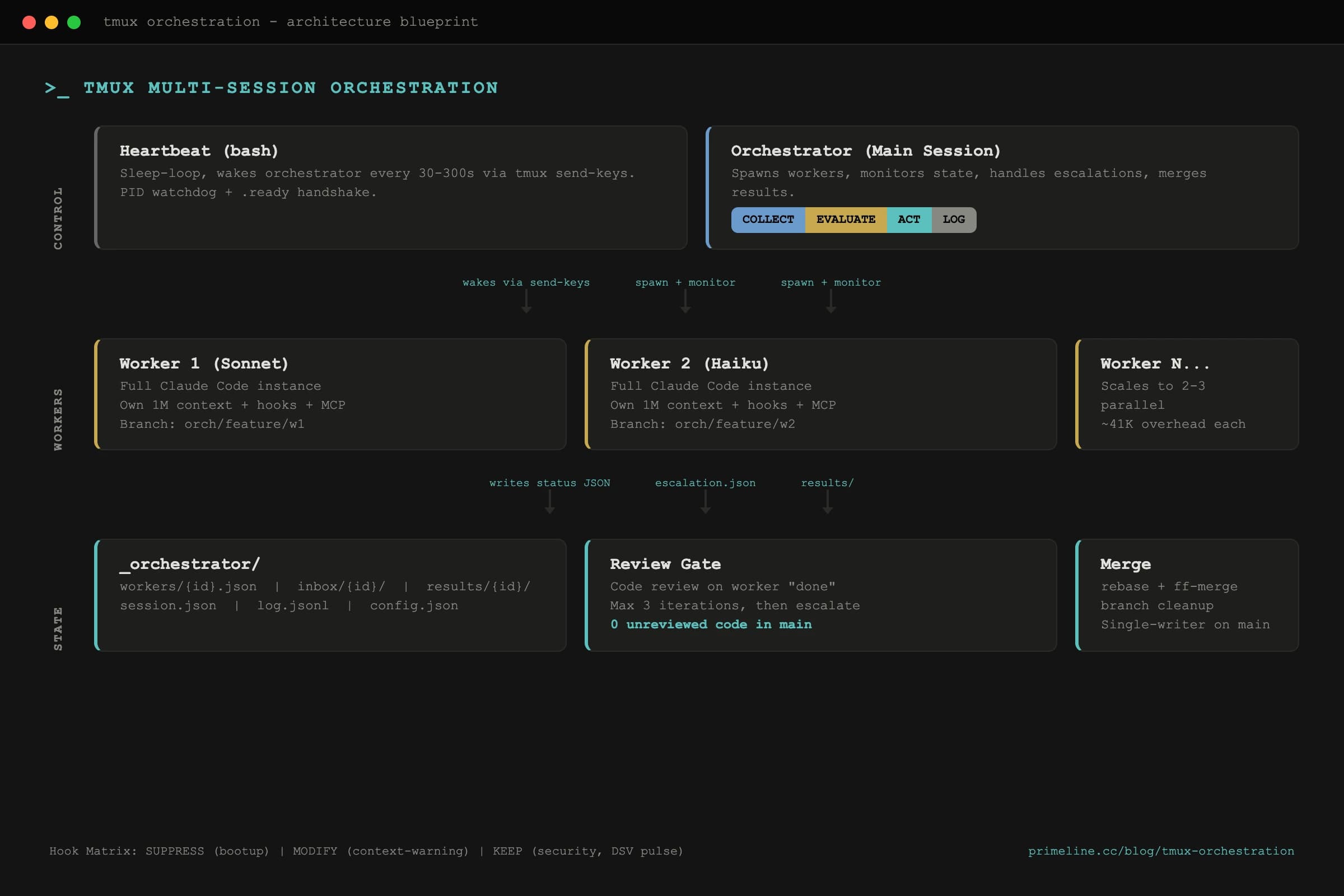
The worker startup template is lightweight on purpose. Workers are full Claude Code instances - they inherit all your project's skills, hooks, and MCP servers. The template just gives them task context, coordination rules, and one critical instruction: ask, don't guess.
Claude Code tmux Hook Matrix: What Workers Inherit
Workers run with ORCHESTRATOR_WORKER_ID set in their environment. Hooks check this variable and adjust behavior in three categories:
Workers inherit memory bootup context from the orchestrator template instead of running it themselves, which keeps their context window clean for actual work. But security hooks and DSV pulse monitoring stay fully active.
The KEEP category is the important design choice, and it is the one thing I would still argue for over a subagent config. Workers get the same security tier checks, the same self-correction hooks, the same reasoning hygiene monitoring as the main session - by inheritance, not by declaration. Nothing to keep in sync.
How Does the Claude Code Orchestrator Cycle Work?
Every monitoring interval, the orchestrator runs a 4-step cycle. Intervals adapt based on worker state: 30 seconds when stuck, 120 seconds during normal operation, 300 seconds when idle.
COLLECT reads each worker's status file and falls back to capture-pane idle detection if a status file is stale. The idle detector checks the last 12 lines for Claude's prompt character, with a spinner override - if Claude is actively thinking, it's not idle even if the prompt is visible.
EVALUATE maps each worker to one of six states: SAFE_TO_RESTART, DO_NOT_INTERRUPT, CONTEXT_LOW_CONTINUE, RATE_LIMITED_WAIT, ERROR_STATE, or UNKNOWN. Only idle workers receive commands. This step also scans inbox/{id}/escalation.json for worker questions - blocking escalations get priority handling.
ACT executes decisions: send reminders, answer escalations, trigger code review when a worker reports "done", or merge results after review passes. The review gate is a hard rule - zero unreviewed worker code lands on main. Workers get up to 3 review iterations before the orchestrator escalates to the user.
LOG writes an audit entry to log.jsonl, updates session state, and touches .ready to signal the heartbeat that the cycle completed.
Real Result: 3 Autonomous Phases
I used this system to run Lucy (a Telegram/Discord assistant) through phases 5-7 autonomously. The orchestrator spawned a worker session, gave it the phase plan, and monitored progress. The worker ran for over an hour - implementing cascading delegation, pairing a second user, and writing 6 iPhone Shortcut guides. It escalated twice (both non-blocking questions about naming conventions), and the review gate caught one issue on the first pass.
My own estimate of the time saved is around 3 hours of context-switching across the three phases. That is an estimate from one run, not a benchmark - I did not run the same phases twice to compare. The worker held full context across all of them.
Would I get the same result from subagents today? For that run - probably yes, and with less machinery. What I would lose is the moment at minute 40 where I attached to the window, read what it was about to do, and typed a two-word correction.
The full tmux orchestration system lives in its own repo: primeline-ai/claude-tmux-orchestration. Open source, MIT licensed. It pairs naturally with Evolving Lite for the memory and delegation layers workers inherit through their full Claude Code session.