free & open source Claude Code memory plugin
A self-evolving Claude Code plugin that learns from your corrections.
Persistent memory, automatic context management, smart delegation - install once and your Claude Code gets better every session.
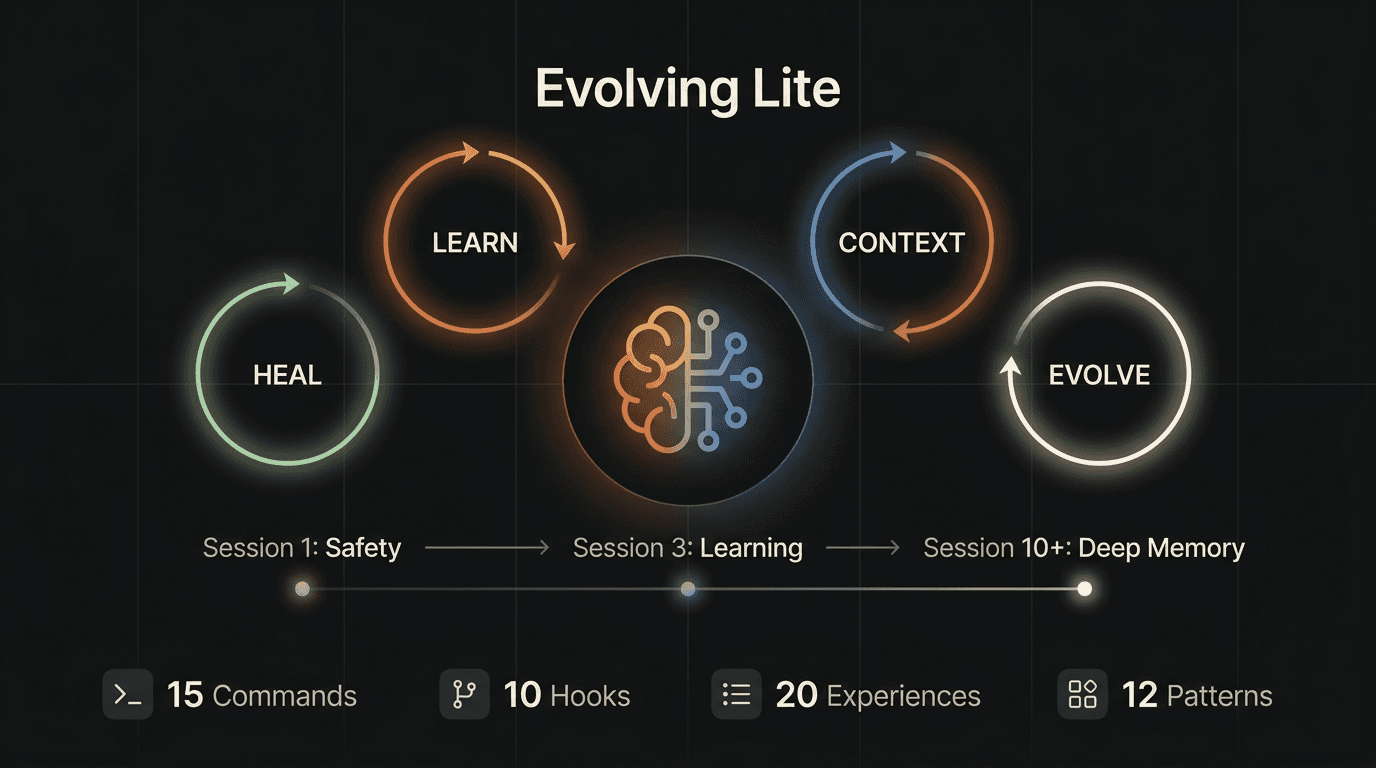
deep dive
See how it works
progressive activation
It grows with you
No setup marathon. Features activate as you use the system.
Tier 1 - Immediate
Day 1: Safety & Memory
- Session memory - Claude knows where you left off
- 20 pre-warmed experiences from production workflows
- Context budget monitor - warning at 70%, handoff prompt at 93%
- 10-level bash security - blocks rm -rf, logs npm install -g
- Hook health sentinel - every process proves it works
Tier 2 - After 3 sessions
Week 1: Learning & Delegation
- Correction detection - learns from your feedback automatically
- Auto-delegation - routes search tasks to specialized agents
- Session summaries - documents what happened and what's next
Tier 3 - After 10 sessions
Month 1: Deep Memory & Evolution
- Deep recall - injects relevant experiences while Claude thinks
- Auto-archival - cleans up stale data, keeps what matters
- Knowledge rescue - extracts insights before context compaction
what happens automatically
4 feedback loops run in the background
You don't need to do anything. The system works while you work.
Learn Loop
Learning from mistakes
What you notice
The correction is on record instead of in your head.
What you do
Correct Claude as usual. There is no separate note-taking step.
Context Loop
Never lose work again
What you notice
You never lose important context to compaction.
What you do
Nothing. Just keep working.
Delegation Loop
Right task, right agent
What you notice
Big searches don't pollute your main context.
What you do
Nothing. Just ask like always.
Heal Loop
Self-repairing system
What you notice
If something breaks, you know immediately.
What you do
Nothing, until a warning appears. Then: /evolving-update
optional, not required
15 commands you never have to use
Everything works automatically. Commands exist for when you want control, not when you must.
/debug
Structured 4-phase debugging cycle. Observe, hypothesize, test, solve.
When: Bugs that take more than 10 minutes.
/plan-new
Multi-stage planning with discovery, construction, and adversarial hardening.
When: Features touching 2+ files. Refactorings. New projects.
/remember
Explicitly teach Claude something that persists across sessions.
When: Decisions, patterns, or knowledge Claude can't learn from mistakes.
/whats-next
Session handoff. Shows where you left off and what's next.
When: Start of a new session. After a break.
/sparring
Radical brainstorming. Claude takes the counter-position and challenges your idea.
When: Before big decisions. When you need a sparring partner.
/context-stats
Shows context window usage and what takes the most space.
When: When a session feels slow. Out of curiosity.
/evolution
Shows what the system has learned, archived, and optimized since your last session.
When: Transparency. Trust. Curiosity.
/review
Structured code review with severity categorization and security focus.
When: Before committing. After implementing a feature.
optional extensions
Each layer is free. Each layer compounds.
Evolving Lite works alone. These make it stronger.
transparency
What it does. What it doesn't.
Does NOT
- ✗Send data externally - everything stays on your machine
- ✗Modify your settings.json - standard plugin installation
- ✗Run destructive bash commands - 10-level security blocks them
- ✗Change your code silently - all changes go through Claude's normal workflow
- ✗Store passwords, API keys, or credentials - content scanner checks
Does
- ✓Saves experiences as JSON files in _memory/experiences/
- ✓Logs tool usage counters for evolve optimization (no content, just counts)
- ✓Creates session summaries as markdown files
- ✓Checks bash commands against known danger patterns
- ✓Registers hooks via the Claude Code plugin system
Run /evolution anytime to see what changed. Read _memory/experiences/ - it's all readable JSON. Disable with claude plugins disable evolving-lite.
FAQ
Install in 30 seconds
Three steps. No API keys. No build step. No config.
# 1. Clone
git clone https://github.com/primeline-ai/evolving-lite ~/.claude/skills/evolving-lite
# 2. Run the one-time setup script
bash ~/.claude/skills/evolving-lite/setup.sh
# 3. Done. Start Claude Code.
claude
Evolving Lite v1.0 initialized.
Memory: ready | Hooks: 4 active (Tier 1) | Experiences: 20 pre-warmed
Next: Just work normally. The system learns from you.
Free. Open source. MIT licensed. No strings attached.