Claude Code skills not triggering is almost never a bug in the skill
You wrote a skill. The instructions inside it are good. You have tested them by pasting them into a chat and they work. Then you install it, do the exact work it was built for, and Claude never calls it. You go back and improve the body. It still never runs.
I had twenty skills on this machine and I went looking for how many of them were actually being chosen. The answer sent me into the frontmatter, not the body, and then into a character budget I did not know existed.
TL;DR: Claude picks a skill from a short listing of names and descriptions loaded at startup. The body of the file is invisible at that moment. So there are four ways a correct skill never runs: the description says what it does instead of when you need it, the field everyone reaches for does nothing on its own, the description gets silently deleted to save space, or the model does the job by hand instead. Three of the four give you no error.
The questions people actually ask, and where each is answered here. Why does my skill not trigger? The listing is the whole decision. Why do my skills only fire some of the time? Same answer, and I measured the size of it. Why are most skill files you find online pointless? They put the work in the half nobody reads. Is Claude ignoring my skill, or never seeing it? Two different problems, two different fixes. Should I use when_to_use? It is appended to description, so it changes nothing by itself. Why did it work and then stop? Your description was probably deleted. How do I check my own setup? Four commands.
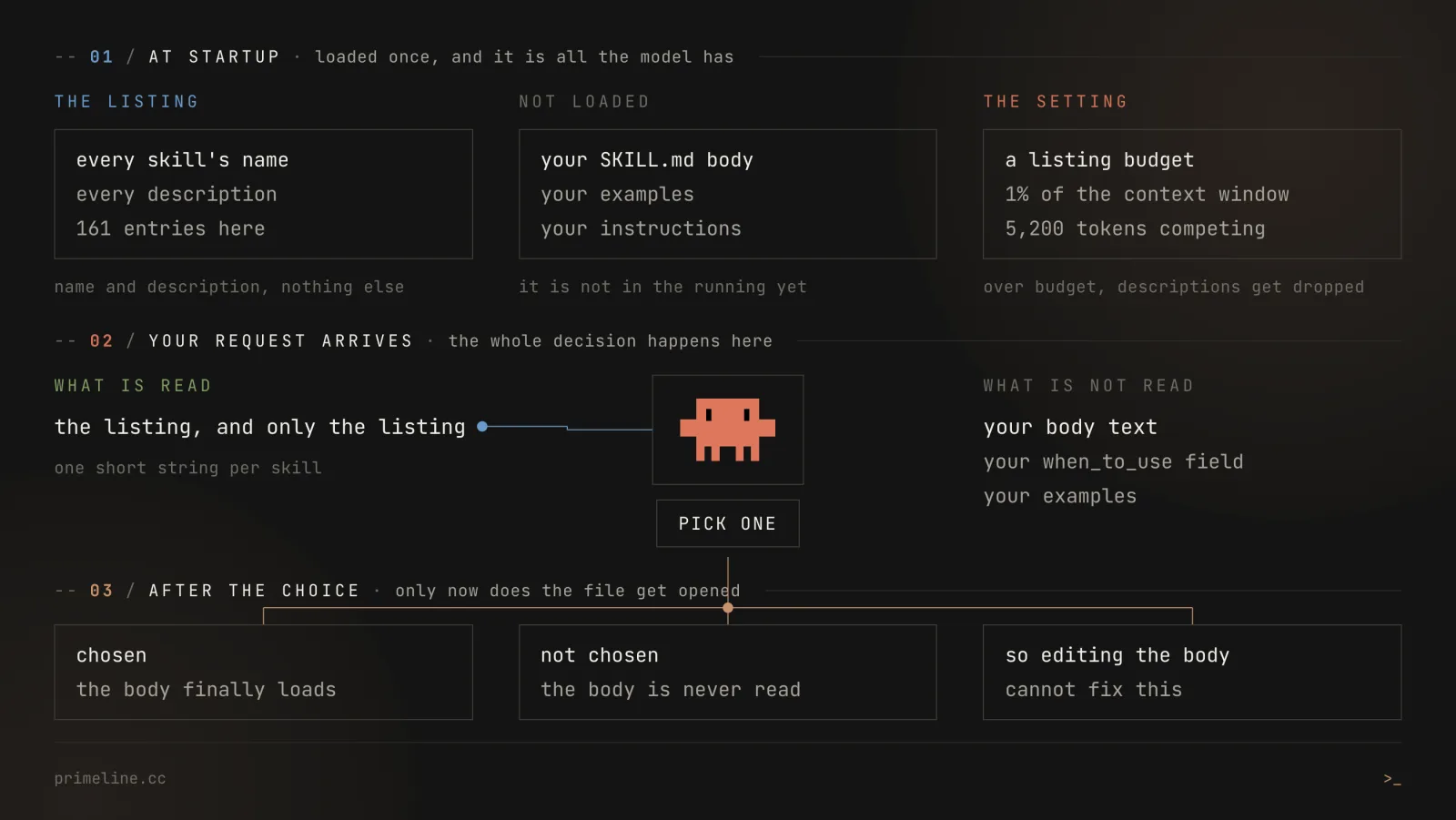
The model never reads your skill before it picks it
Claude Code loads a listing at startup: every available skill's name and description, and nothing else. That listing sits in the context window for the whole session. When you type a request, the choice of which skill to invoke is made against that listing alone.
The body of your SKILL.md is not in the running at that point. It gets loaded after the skill is chosen. Anthropic calls this progressive disclosure and documents it as three levels: metadata always loaded, the file body loaded on trigger, bundled files loaded on demand.
That single fact explains most of what follows. If you are fixing a skill that never triggers by editing its body, you are editing something the model has not seen yet.
Why most skill files you find online are dead weight
The most upvoted question in this corner of the internet is why nearly every skill file people publish looks useless. Open ten of them and nine start the same way: "You are an expert full-stack engineer." Then a long, careful body.
That body is not the problem. The problem is where the effort went. All of it sits in the half the model has not read yet when it decides. The description, the one line that is in the room at decision time, is usually an afterthought.
This also settles a question people ask in the wrong shape. "Claude is ignoring my skill" and "Claude never saw my skill" look identical from the outside and have opposite fixes:
| What you see | What is actually happening | The fix |
|---|---|---|
| The skill never runs, on any wording | It was never in the running. The description does not name your situation, or it was cut for space | Rewrite the description, or free up listing space |
| It runs sometimes, not always | Same cause, weaker. The description half-fits, so the choice is a coin flip | One sentence naming the situation. In my runs that moved a tool from 0 of 10 to 10 of 10 |
| It runs, and does the wrong thing | It really was chosen, and the body is at fault | Now, and only now, edit the body |
The third row is the only one where rewriting the body helps. The first two are decided before the body exists.
There is a fourth possibility worth ruling out before any of this: a skill may be the wrong shape for the job. A slash command you always type yourself, a subagent, or a server has different rules about when it runs. Skills vs plugins vs MCP vs subagents is the map for that choice.
Cause 1: the description says what, not when
Most descriptions are labels. They answer "what is this tool" accurately and completely, and they lose.
I ran this as a proper experiment rather than guessing, and wrote the whole thing up separately: one skill, one frozen prompt, 230 runs, and the only thing that changed between arms was the sentence describing the tool. A description that stated only what the tool does was picked 0 times out of 10. The same tool, same body, with one added sentence saying when you need it, was picked 10 out of 10.
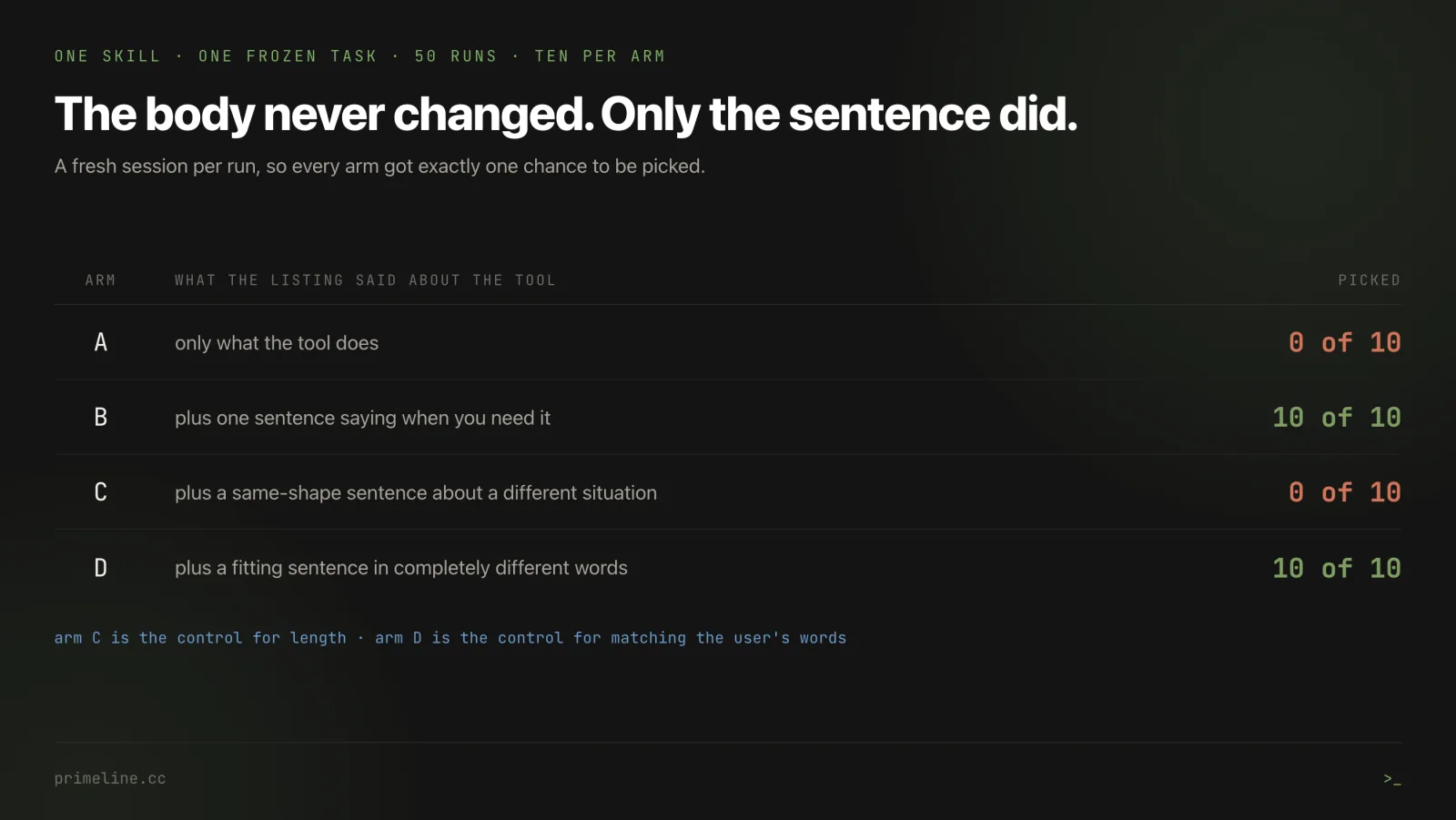
Three control arms rule out the obvious alternatives. A near identical length sentence describing a different situation scored 0 of 10, so it is not about adding text. A fitting sentence sharing no vocabulary with the prompt scored 10 of 10, so it is not keyword matching.
The rewrite is small. Here is the shape:
# before: accurate, and never chosen
description: Candidate comparison with a tradeoff table

# after: names the situation the reader is in
description: >
  Candidate comparison with a tradeoff table. Use when the user is weighing
  two or more named alternatives against each other and wants a reasoned
  recommendation with the tradeoffs made explicit, rather than an
  off-the-cuff opinion. Example requests: 'which of these two should I go
  with', 'A or B here, and why'.
Write it as the user's situation in plain words. Do not stuff it with keywords you hope will match, because the experiment shows you do not need to, and chasing keywords is how you end up writing for a string matcher instead of a reader.
Cause 2: the field you were told to use is not a lever
Skill frontmatter has a field called when_to_use. It reads like the purpose built answer to exactly this problem. It is not, and the documentation says why.
From the Claude Code skills reference: when_to_use is "Additional context for when Claude should invoke the skill... Appended to description in the skill listing and counts toward the 1,536-character cap."
Appended. The two fields are joined into one string before the model sees anything. In my experiment I put the identical sentence in when_to_use in one arm and in plain description in another, then hashed the listing line out of all fifty transcripts. Both produce the same 311 byte entry, same SHA-256. Same score, 10 of 10 either way.
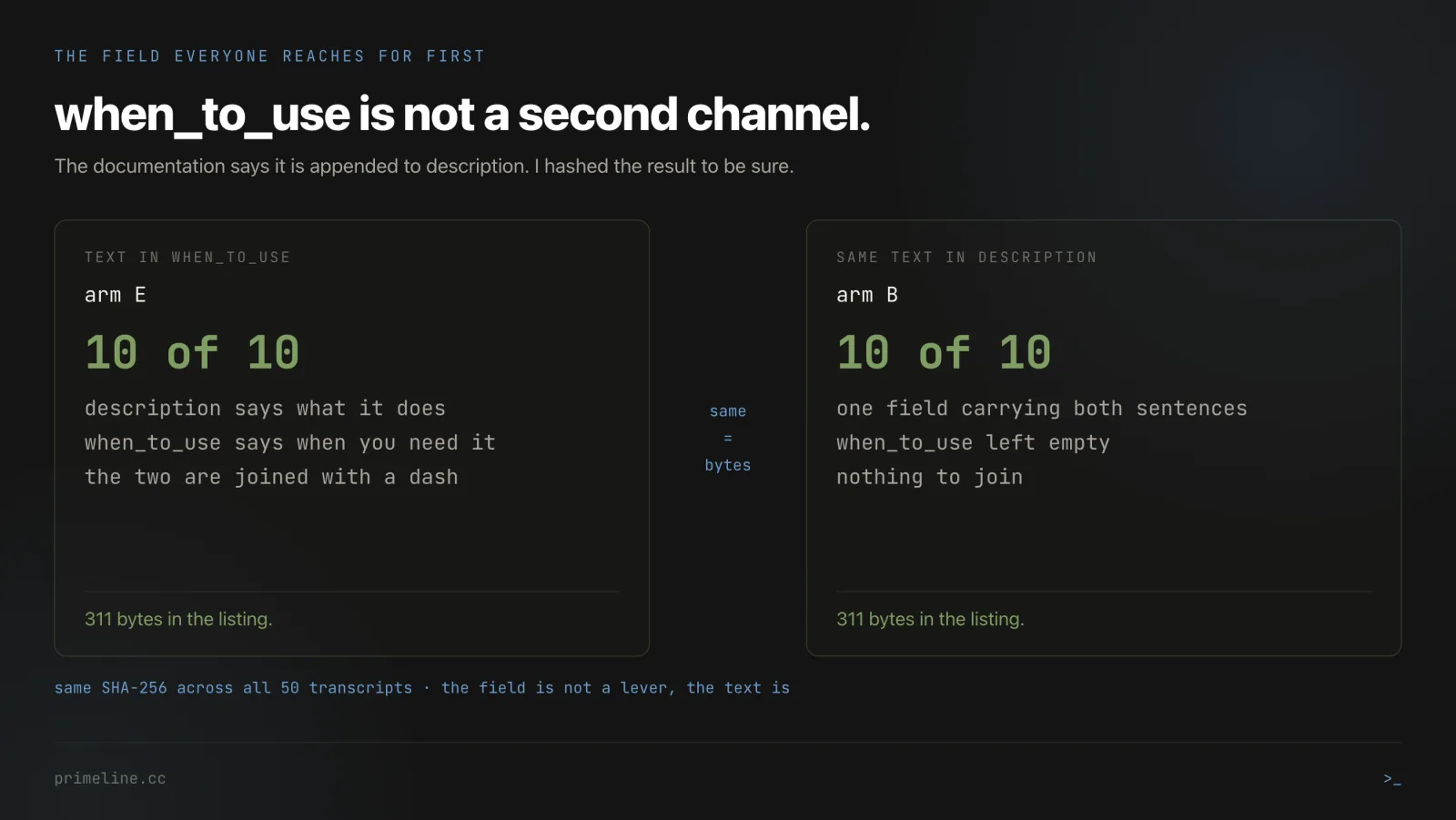
So the field is not required. The text is what matters, and it matters wherever you put it.
I checked all 161 commands and skills in my own setup on 14 September 2026. Exactly zero declare when_to_use. Grepping for the literal string "when to use" or the field name returns nothing at all, across every file. If you search your own setup for the field name and find nothing, that is not proof your setup is broken. It is the normal state.
One honest limit on this one: both arms scored at the top of the range, and two conditions at 100% cannot prove they are identical in harder cases. What the byte comparison does prove is that in this setup the same characters reach the model either way, which is a mechanism rather than a statistic.
Cause 3: your description was silently deleted
This is the cause that produces the "it worked last week" report, and it is the one almost nobody checks.
The listing has a character budget. It defaults to one percent of the context window, controlled by a setting called skillListingBudgetFraction. Each entry's description plus when_to_use combined is capped at 1,536 characters. When the total overflows, Claude Code does not refuse. It drops descriptions, starting with your least used skills, until it fits, and the warning it writes goes to the debug log, visible with --debug. Those skills stay in the listing as bare names with no text at all.
A bare name is close to useless for selection. The skill is present, visible, and unpickable.
Two things make this worse than it sounds.
It is zero sum once the budget is full. I measured this directly: adding 267 characters to one skill's description grew the total listing by only 20 characters, from 29,972 to 29,992. In the same change, seven other skills silently became names only. Their descriptions had held 236 characters. One of the seven was security-review, which lost 49 characters. The other six lost 187. Lengthening one description is not adding, it is trading, and you do not get to choose who loses.
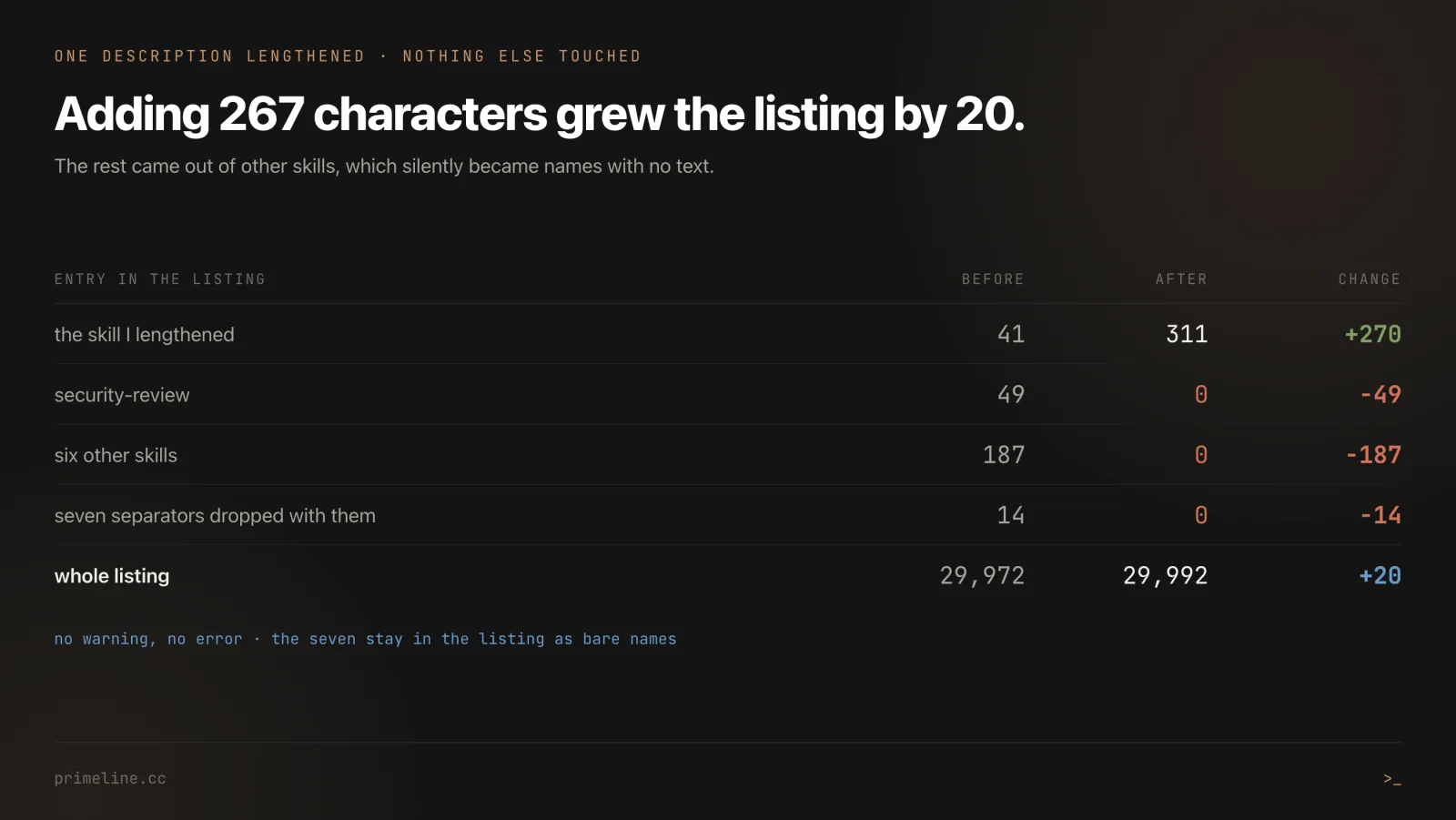
The eviction order is a trap. Descriptions are dropped least used first. A skill nobody has used yet is exactly the skill that gets stripped first, which keeps it unseen, which keeps it unused. A brand new skill can therefore be deleted from the listing before it ever had a chance.
Here is what my own setup looks like, measured rather than estimated:
| What I measured | Skills | Commands | Total |
|---|---|---|---|
| Entries | 20 | 141 | 161 |
| Characters of description | 5,393 | 15,557 | 20,950 |
| Mean characters per entry | 269 | 110 | 130 |
| Entries with no description at all | 0 | 26 | 26 |
Entries declaring when_to_use | 0 | 0 | 0 |
| Entries saying when to reach for them | 5 | 32 | 37 |
Two limits are in play here, so keep them apart. The per entry cap is 1,536 characters. The listing budget is also in characters: the docs call it a character budget that scales at 1% of the context window, with a fallback of 8,000 characters. My own descriptions come to 20,950 characters in total.
Because the budget scales with the context window, the same set of descriptions can fit under a larger window and overflow under a smaller one. Switching models can change which descriptions the listing keeps, with nothing in your own setup edited.
There are three levers, all documented:
{
  "skillListingBudgetFraction": 0.02
}
Raising the fraction gives the listing more room, at the cost of context you wanted for work. There is also a SLASH_COMMAND_TOOL_CHAR_BUDGET environment variable for a fixed character count instead of a fraction, and a skillOverrides setting that lets you mark low value skills as name only on purpose, freeing room for the ones that matter. Mine is at 0.02, which is double the default, and it was set deliberately after I hit this.
This lives in primeline-ai/evolving-lite - the self-evolving Claude Code plugin. Free, MIT, no build step.
Cause 4: the model does the job by hand instead
The three causes above are all about being chosen. This one is different: the skill is chosen correctly, or would be, and the work still happens somewhere else.
I wrapped a one line shell command in a skill and ran ten sessions on tasks that fit it. The wrapper was picked once. In eight of the ten runs the model ran the underlying script directly, without going through the skill. One run reached neither.
So the skill was not rejected. It was routed around.
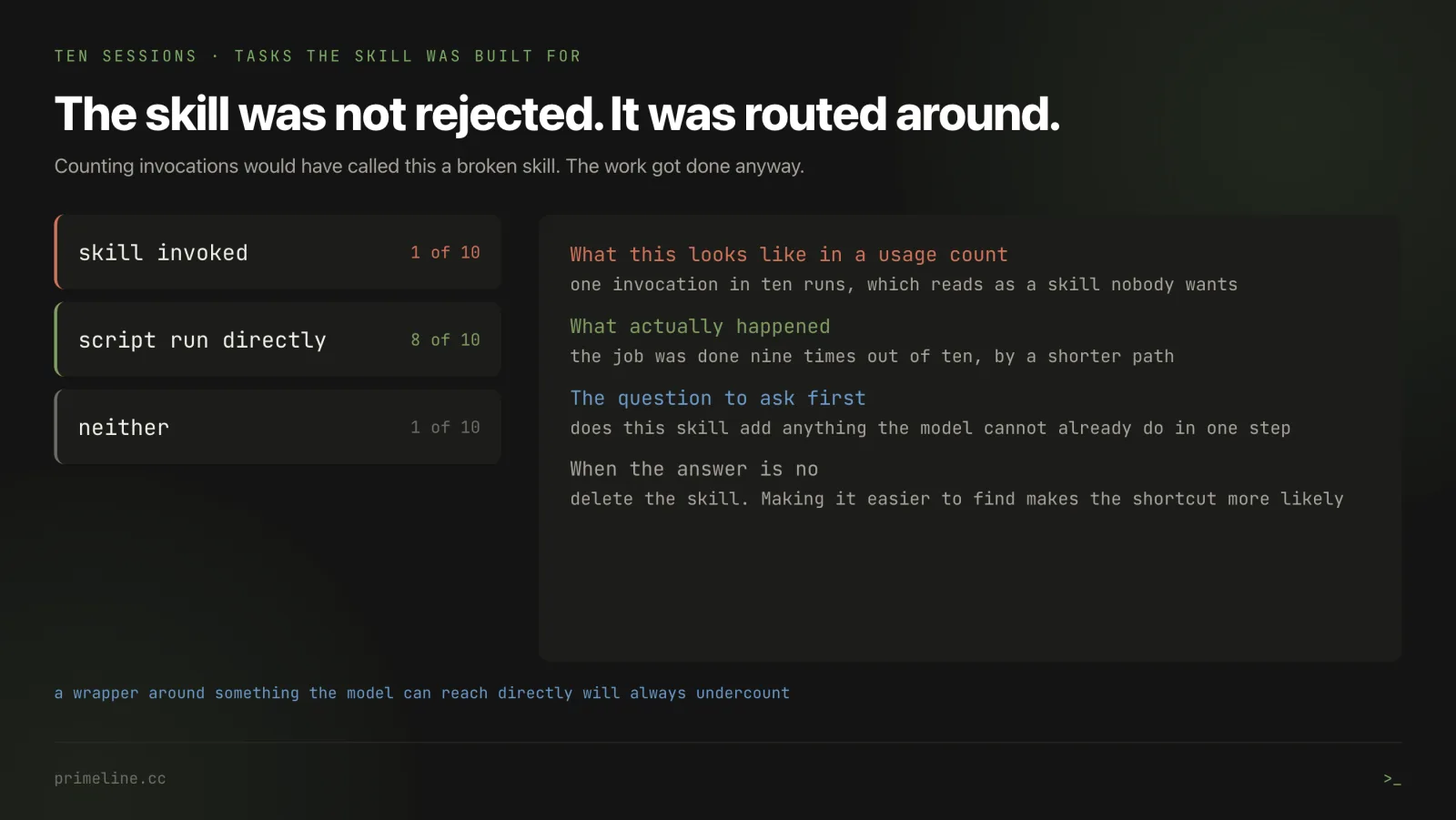
That has a practical consequence for how you judge any of this. Counting invocations undercounts real usage whenever the skill wraps something the model can reach directly. Before you rewrite a description, ask whether the skill is adding anything the model cannot already do in one step. If it is not, the honest fix is to delete the skill, not to make it more findable.
There is a second version of the same problem that bit me harder. In the experiment above, the arm that never selected the tool gave a better answer than the arm that did, because the tool's own instructions forbade reading files and the model went and read the actual data instead. Raising the selection rate on a tool like that raises the rate at which a worse shortcut gets taken. Fix the body before you fix the description.
The part I cannot explain
I am not going to sell this as solved, because it is not.
After rewriting descriptions properly, I had ten tools carrying a clear sentence about when to reach for them. Across roughly 50,000 real tool calls, those ten were used 14 times in total.
Fourteen. On tools whose wording I had already proven works in a controlled test.
I have three candidate explanations and no measurement that separates them. The chance to use those tools may genuinely be rare in my day to day work. The model may be correctly judging that the tool is not worth the detour. Or my wording may fit the test prompt and not fit how I actually ask for things. All three are plausible. None is established.
What I can say is that the controlled result and the real world result are both true at once. Description wording decides the choice when the opportunity is held fixed. It does not follow that fixing wording gets your tools used, and anyone telling you otherwise is extrapolating past their evidence, including me if I stopped this section one paragraph earlier.
The four commands I would run on your setup
Run these before changing anything. Each one answers a different question above.
1. How many of your skills say when to reach for them?
grep -L "[Uu]se when\|[Rr]each for" ~/.claude/skills/*/SKILL.md | wc -l
Read that as a rough screen, not a count. grep -L reads the whole file, not the description field, so a skill that says "Use when" somewhere in its body counts as a hit even though the listing never shows those words. Two of my twenty do exactly that. It tells you which files to open; the real number needs you to look at the frontmatter. On my machine the screen returns 13 of 20. Note the capital letter in the pattern: most real trigger sentences start with "Use when", and a lowercase-only search reports 19 of 20 and makes the problem look total.
2. Is your listing over budget?
claude --debug
/doctor
When the listing exceeds its budget, Claude Code writes a warning to the debug log, visible with --debug. /doctor gives an estimate of the listing's context cost and its biggest contributors. Do not use the Skills row in /context for this check: it reports the size of the listing after the budget is applied, so it shows what the model receives, not what was cut.
3. Which skills are actually being used?
/skill-doctor
Reports per skill context cost and how often each was invoked in the session, and flags the ones never used. Needs Claude Code 2.1.252 or newer.
4. Does your skill survive a change?
claude plugin eval <plugin-or-path> --ablation with-without
This runs your skill against realistic prompts with and without the plugin loaded and scores the difference. It arrived in Claude Code 2.1.269 on 11 September 2026, so any guide calling it early access is out of date.
One warning about the last one, from running it. Its most common first finding is that the skill exists and does not get picked on natural phrasing, which is the whole problem in this article. But its coverage is bounded by the prompts you give it. I deleted a rule from a test skill that the prompts never exercised, and the suite stayed green while the skill was broken. Before trusting a green result, break the skill on purpose and watch the check go red.
If you want a set of skills already written this way, the five workflow skills in primeline-ai/primeline-skills all carry a situation sentence in the description, and Evolving Lite is the session memory and hook layer they sit on. If you are still deciding which extension point you need at all, skills vs plugins vs MCP vs subagents covers that choice, and how to build a plugin is the step by step.
Honest scope
One machine, one model. Everything measured here is Claude Opus 5 on Claude Code 2.1.270, on my own setup of 161 commands and skills. Other models may weigh a listing differently. I have not tested that.
The 14 in 50,000 is unexplained. It is the most important number in this article and I cannot tell you why it is that low. See the section above for the three candidates and the missing measurement.
The counts are mine, the mechanism is documented. The character counts, the entry counts and the zero sum measurement are from my own machine and I recomputed them while writing this. The 1,536 character cap, the one percent default and the eviction order come from Anthropic's documentation, quoted.
How the counts in that table were taken, since the method changes the answer. Each entry is its description field plus its when_to_use field, read out of the frontmatter only. A one-line grep over whole files gives a different, slightly higher number, because trigger words often sit in the body where the listing never shows them. The entry counts, the zero counts and the 26 commands with no description reproduce from a plain directory listing; the character totals need the frontmatter reader.
One fix I have not tested. A published suggestion for the eviction trap is to invoke an unused skill once by name, to lift its use count off zero so it stops being first in line for deletion. That is a plausible mechanism and I have not run it. Do not take it from me as measured.
Counting invocations is not counting usage. The wrapper measurement shows a skill scoring 1 of 10 while the work got done 9 times. Any number in this article that counts invocations carries that caveat.
Updated 2 October 2026: the skill listing budget section now uses only the units the docs give, and the over-budget check points to the debug log warning and /doctor instead of /context. Figure 1 now counts in characters like the text, and figure 4 names the debug-log warning. The zero-sum paragraph now gives the measured numbers behind figure 4.

![Claude Code Auto Mode Skips Edit Hooks: I Tested It [2026]](/_next/image?url=%2Fblog%2Fclaude-code-auto-mode-edit-hooks-hero.webp&w=3840&q=75)
![Claude Code Hooks Fail in Runs: 76% vs 18% [2026]](/_next/image?url=%2Fblog%2Fclaude-code-hooks-fail-in-runs-hero.webp&w=3840&q=75)